
Clear answers from SAP Business One
Live, read-only reports for finance, sales and production. Bank guarantees, cash, costing, GST and TDS — in the browser, on your own server.
Start with a free trial on your SAP company, then pay online using the licence request code from your install.
Included modules
- Bank GuaranteesTrack every advance and performance bank guarantee against your SAP sales orders.
- CashflowPlan incoming and outgoing cash from live SAP Business One orders.
- CostingSee what each finished good really costs, from BOM to production.
- SalesSee sales performance by customer, item and period from live SAP orders and invoices.
- FinanceSee receivables, payables, GST, TDS and inventory ageing from live SAP data.
- MastersShared customer master and groups for BG and Cashflow.
Also on b1insight.in — buy, renew, and trial downloads on this site via the customer portal.
B1 Insight
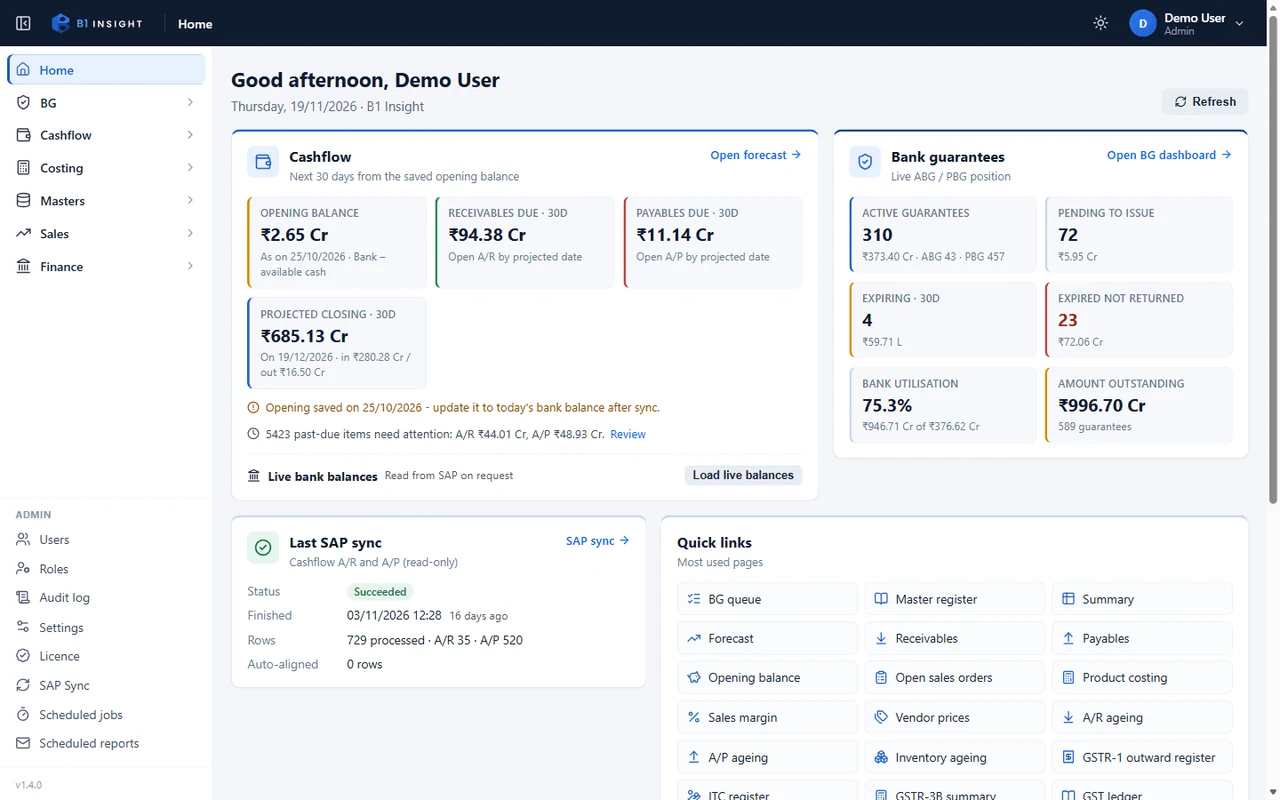
Six modules for bank guarantees, cashflow, costing, sales, finance and masters — browser access on your LAN with read-only SAP HANA.
How buying works
Trial on your SAP server first, then pay with your request code
We do not collect payment until you have installed and tested B1 Insight on your own company database. Online checkout needs the request code from your server (Admin › Licence).
- 1Download trialGet the installer from this site and install on your LAN.
- 2Test 30 daysAll modules, up to three users — on your real SAP B1 company.
- 3Copy request codeB1 Insight → Admin › Licence — code starts with B1I1-.
- 4Pay onlineCustomer portal: paste the code, choose modules, pay, upload .lic.
Start with trial downloadAlready testing? Pay with request code →
Six modules
Licence only the work your team does.
Every report reads SAP live, except Cashflow, which keeps a synced copy. Excel export is on the reports. Amounts can be shown in rupees, thousands or lakhs.
Finance spotlight
GSTR-1, ITC, GSTR-3B and GST ledger reconciled to your GL. TDS payable and receivable in 26Q- and 26AS-style views.
Scheduled report emails
Email Finance ageing, GST and TDS registers plus Sales dashboards and registers on a daily, weekly or monthly schedule — summary in the body, Excel and optional PDF attached.
Bank Guarantees
Manage advance (ABG) and performance (PBG) guarantees against SAP sales orders.
- Import sales orders from SAP to create pending ABG/PBG rows
- Issue, submit, return and revise guarantees with full history
- Bank limits, utilisation and expiry highlighted on-screen
Operations
- BG dashboard with KPI tiles and summary matrix
- Queue for issue, submit and return actions
- Master register with customer, project and bank filters
- Sales orders with lot plan, receipts and PDF attachments
Setup
- Payment terms (ABG/PBG %)
- Bank limits and defaults
- Legacy import from Excel
Track every advance and performance bank guarantee against your SAP sales orders.
The reports SAP Business One does not hand you.
Why teams add B1 Insight — statutory and management reporting that reads SAP live, without SQL or Crystal skills.
- CFOs & accounts — ageing, GST, TDS, cashflow
- Sales leadership — order book, trends, reconciliation
- Production & costing — BOM vs actual, WIP, margins
- Commercial & treasury — ABG/PBG against sales orders
Challenge
GST and TDS don't tie to the GL
B1 Insight
Finance registers reconcile documents to GST and TDS accounts and explain differences.
Challenge
Cash forecasts live in spreadsheets
B1 Insight
Cashflow projects receivables, payables, open orders and planned cash into a daily forecast.
Challenge
Bank guarantees tracked in Excel
B1 Insight
Full BG lifecycle linked to SAP sales orders, lots and dispatch — with bank-limit utilisation.
Challenge
True FG cost is hard to see
B1 Insight
Costing traces actual cost level by level and compares BOM, WIP and sales margin.
On your server
Install once. Open it in the browser.
Windows service on your LAN, read-only SAP on HANA, SQL Server for app data — teams use any browser on the network.
- Deployment
- Windows installer · runs as a service on your LAN
- Access
- Browser at http://server:5080 — no client install on PCs
- SAP
- HANA only · read-only ODBC user (SELECT)
- App database
- SQL Server Express (optional) or SQL Server 2016+
- Trial
- 30 days · all modules · up to 3 users · no card
- Version
- v1.4.0 (14 Nov 2026)
Also included
- Home dashboard
Cashflow, BG, Costing and Finance quick links plus last SAP sync status.
- Excel everywhere
Export on reports; round-trip on Cashflow plans where your role allows.
- Roles & permissions
View / add / update / delete / export / import per screen.
- Audit log
Sign-ins, changes and blocked actions — filterable and exportable.
- Themes & help
Light, dark or system UI; “?” help on every page.
- Read-only SAP
SELECT-only HANA access; secrets encrypted at rest.
Local users, role-based rights per screen, and an audit log — separate from SAP logins.
How to buy
From install to a signed licence.
Install the 30-day trial on your server first. When you buy, paste the request code from B1 Insight Admin › Licence — it ties payment to your SAP company. SAP partners: see the co-sell page.
Install
Run the Windows installer on a server that can reach SAP Business One on HANA. It runs as a service.
Trial
30 days, all modules, up to three users. No card and no sign-up on the server.
Request code
In B1 Insight, open Admin › Licence and copy the request code. It names your SAP company.
Pay
Choose modules and users in the customer portal and pay. A signed licence file is emailed to you.
Upload
In Admin › Licence, upload the .lic file. Access opens immediately.
Pricing
Per month, billed yearly.
Prices are set by Nettigo and loaded live. GST is extra. A blank price means that module is on request and cannot be added to an online order.
Linux / Windows hosting plans are on hosting pricing.
Customization
Standard modules, tailored reports when you need them
The six licenced modules are the standard B1 Insight product — reports and workflows Indian SAP Business One teams use every day.
Standard product
Six modules — BG, Cashflow, Costing, Sales, Finance, Masters — with filters, drill-down, Excel export, and scheduled email on Finance and Sales. Licences are per module and user via the customer portal.
Custom development
Need a different layout, KPI, or new screen? Nettigo can build it in B1 Insight on your server with the same read-only SAP access and roles as standard reports.
How we deliver a custom report
- Try standard modulesUse the trial and confirm an existing report or export already covers the need.
- Describe the gapShare sample output, filters, users, and your SAP B1 on HANA company.
- Contact NettigoContact form, email, or phone — mention “B1 Insight customization”.
- Feasibility reviewWe confirm SAP data access, performance, and where the screen fits.
- Scope and quoteWritten scope, timeline, and price (separate from module licences).
- Build and releaseUAT on your server, then delivery in a B1 Insight build; Nettigo support after go-live.
Questions
Common questions
Does B1 Insight change data in SAP Business One?
No. It uses a read-only HANA user. BG plans, cashflow projections and remarks live in B1 Insight's own database.
Which SAP versions are supported?
SAP Business One on SAP HANA only. Microsoft SQL–based SAP Business One is not supported.
Does it need internet?
Not for day-to-day use on your LAN. Internet is only needed for optional SQL Express download during setup, email and online licence purchase.
What happens when the licence expires?
7-day grace with full access, then BG, Cashflow and Masters become view/export only; Costing, Sales and Finance lock until you renew. Data is never deleted.
Can I pay before installing B1 Insight?
No. Download the 30-day trial, install on the server that reaches your SAP company, and test first. Online payment needs the request code from Admin › Licence on that install — it identifies your SAP database and ties the licence to your machine.
Can I add users or modules later?
Yes — pay only for the rest of the licence year in the customer portal and upload the new .lic file.
Do I get a GST invoice?
You receive a payment receipt by email immediately; our accounts team sends the GST tax invoice separately.
Can I schedule any report by email?
Yes for Finance and Sales. Finance covers eight reports (A/R and A/P ageing, inventory ageing, GSTR-1, ITC, GSTR-3B, GST ledger, TDS). Sales covers the dashboard, register, pending orders, booking and revenue reconciliation, and customer, item and trend views. Costing, Cashflow and Bank Guarantees are not schedulable yet.
Are custom reports or changes possible?
Yes. The six standard modules cover industry-typical reporting for most businesses. If you need business-specific layouts, KPIs, or new screens, Nettigo can build them inside B1 Insight. See the Customization section on this page for the step-by-step process, or contact us by email or phone.
Try B1 Insight on your own SAP company
30-day trial on your SAP company first. When you are ready to buy, use the request code from Admin › Licence in the customer portal.